
- Published on
Monitor your network using Telegram
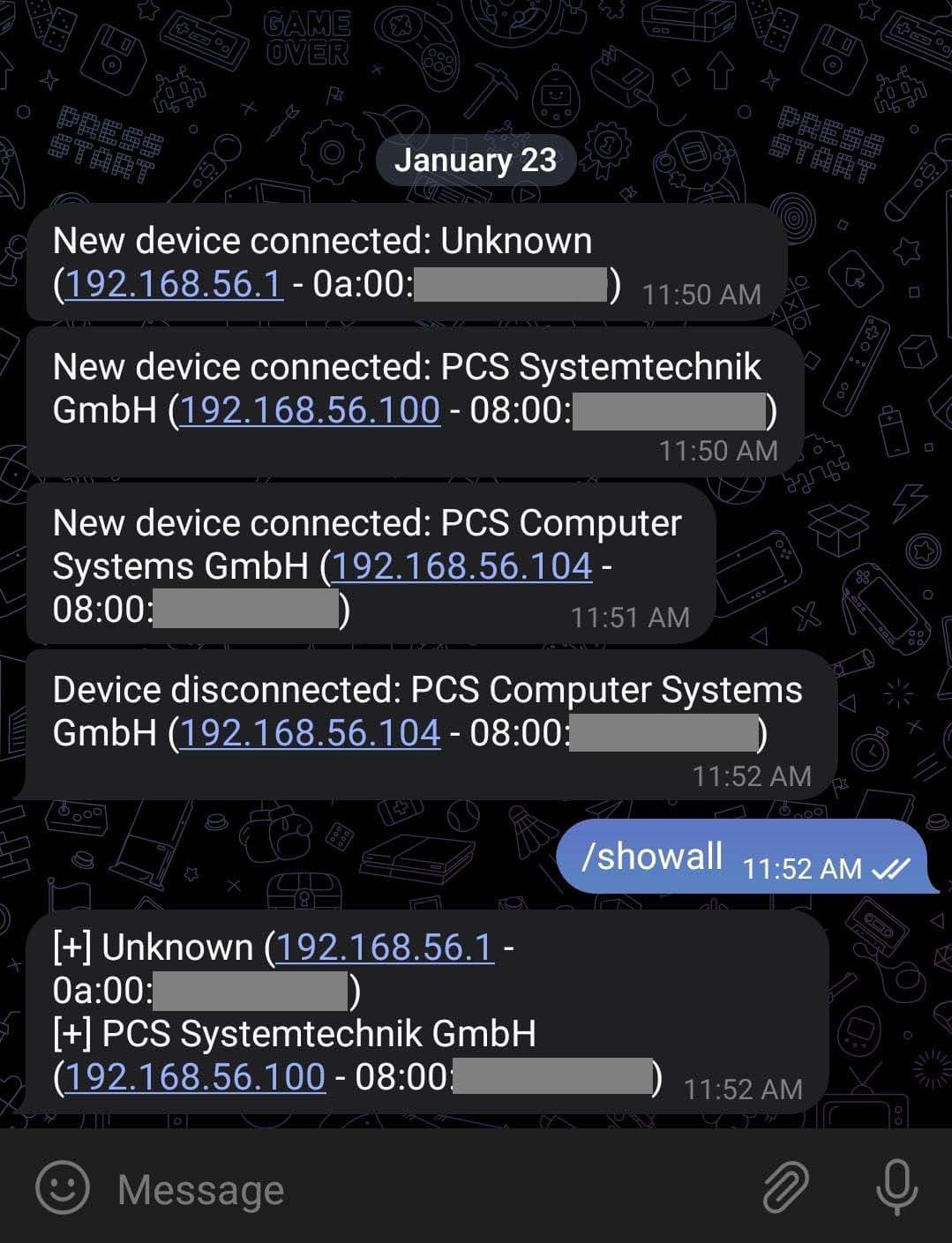
Want to keep track of every device connected to your WiFi? 🚀 With this Python script, you can set up a Telegram bot that notifies you in real-time when a new device connects—or when an existing one disconnects.
This way, you’ll always know who’s on your network, whether you’re at home or away. Notifications can be received directly on your phone or computer through Telegram.
1. Create your configuration file
Inside your project folder, create a file named conf.json. It stores everything the script needs:
{
    "TOKEN": "YOUR_TELEGRAM_TOKEN",
    "CHAT_ID": "YOUR_USER_CHAT_ID",
    "NETWORK": "192.168.1.0/24",
    "INTERVAL": 60
}
- TOKEN → Your bot’s API token from BotFather
- CHAT_ID → Your personal chat ID
- NETWORK → Subnet to monitor (e.g.,
192.168.1.0/24) - INTERVAL → Scan interval in seconds
2. Install Npcap (Scapy requirement)
Scapy needs Npcap to perform network scans.
Linux
sudo dpkg -i npcap-version.deb
sudo apt-get install -f
sudo ldconfig
Windows
Download Npcap.
Run the installer and select:
- ✅ Npcap
- ✅ WinPcap compatibility
Finish installation.
3. Get your Telegram bot credentials
Create your bot with BotFather
- Open Telegram → search for
@BotFather. - Run
/newbotand follow the prompts. - You’ll receive a TOKEN (keep it safe).
Find your chat ID
- Start a chat with
@RawDataBot. - Send
/start. - Copy your chat ID from the response.
4. Script overview
The script does three main things:
- Scans your network for devices (using Scapy).
- Identifies vendors from MAC addresses (via macvendors API or a local file).
- Notifies you on Telegram about new or disconnected devices.
Key functions:
get_mac_vendor(mac)→ Returns vendor name from a MAC address.start_command()→ Continuously scans and notifies about new/disconnected devices.showall_command()→ Lists all currently connected devices.error()→ Handles and logs Telegram errors.start_bot()→ Sets up the Telegram bot and its commands.
5. Code snippets
Import dependencies
from scapy.all import *
from telegram.ext import *
import json, time, requests
Example: Get vendor info from MAC
def get_mac_vendor(mac):
    url = "https://api.macvendors.com/" + mac
    r = requests.get(url)
    if r.status_code == 200:
        return r.text

    mac = mac.upper().replace(':', '')[0:6]
    try:
        with open("mac-vendor.txt", "r", encoding="utf-8") as f:
            for line in f:
                if mac in line:
                    return line[7:]
    except FileNotFoundError:
        exit("Error: mac-vendor.txt file not found.")
    return 'Unknown'
Example: Monitor devices
def start_command(update, context):
    connected_hosts = {}
    old_hosts = []
    while True:
        ans, _ = arping(NETWORK, verbose=0)
        hosts = [h[1].src for h in ans]

        # New devices
        for host in ans:
            mac, ip = host[1].src, host[1].psrc
            vendor = get_mac_vendor(mac).strip()
            if mac not in connected_hosts:
                context.bot.send_message(chat_id=CHAT_ID,
                    text=f"New device: {vendor} ({ip} - {mac})")
            connected_hosts[mac] = (vendor, ip)

        # Disconnected devices
        for mac in old_hosts:
            if mac not in hosts:
                vendor, ip = connected_hosts[mac]
                context.bot.send_message(chat_id=CHAT_ID,
                    text=f"Device disconnected: {vendor} ({ip} - {mac})")
                del connected_hosts[mac]

        old_hosts = hosts
        time.sleep(INTERVAL)
6. Start the bot
with open('conf.json') as f:
    conf = json.load(f)

TOKEN, CHAT_ID = conf["TOKEN"], conf["CHAT_ID"]
NETWORK, INTERVAL = conf["NETWORK"], conf["INTERVAL"]

def start_bot():
    updater = Updater(TOKEN, use_context=True)
    dp = updater.dispatcher
    dp.add_handler(CommandHandler("start", start_command, run_async=True))
    dp.add_handler(CommandHandler("showall", showall_command))
    dp.add_error_handler(error)
    updater.start_polling()
    print("[+] Bot started")

start_bot()
Final notes
You now have a Telegram-powered WiFi monitor that:
- Alerts you when devices connect or disconnect.
- Lists all devices on demand.
- Helps you spot unknown devices instantly.
Full source code is available here 👉 GitHub Repo.