
- Published on
Pwn The Network - Discover devices in the network using ARP scan
Discover Devices on Your Network with ARP Scanning (Python + Scapy)
Whenever a hacker or penetration tester connects to a new network, the first step is always the same: find out which devices are connected. This discovery phase is the foundation of any network pentesting assessment.
There are several ways to scan a network. A common technique is a ping sweep, where ICMP echo requests are sent to every address. Devices that reply are considered “alive.” The problem? Many machines hide behind firewalls that drop ICMP packets, making this approach unreliable.
A more effective method is the ARP scan. Why? Because all devices on a LAN must respond to ARP packets if they want to communicate—firewall or not.
In this article, we’ll explore what ARP is, why it works so well, and how to build your own Python ARP scanner using Scapy.
1. What is ARP?
ARP stands for Address Resolution Protocol. Its job is simple: translate an IP address into its corresponding MAC address so that devices can talk on a local Ethernet network.
When device A wants to send data to device B, it first broadcasts an ARP request:
“Who owns IP 192.168.1.10? Tell me your MAC address.”
Device B responds with its MAC address, and now communication can happen.
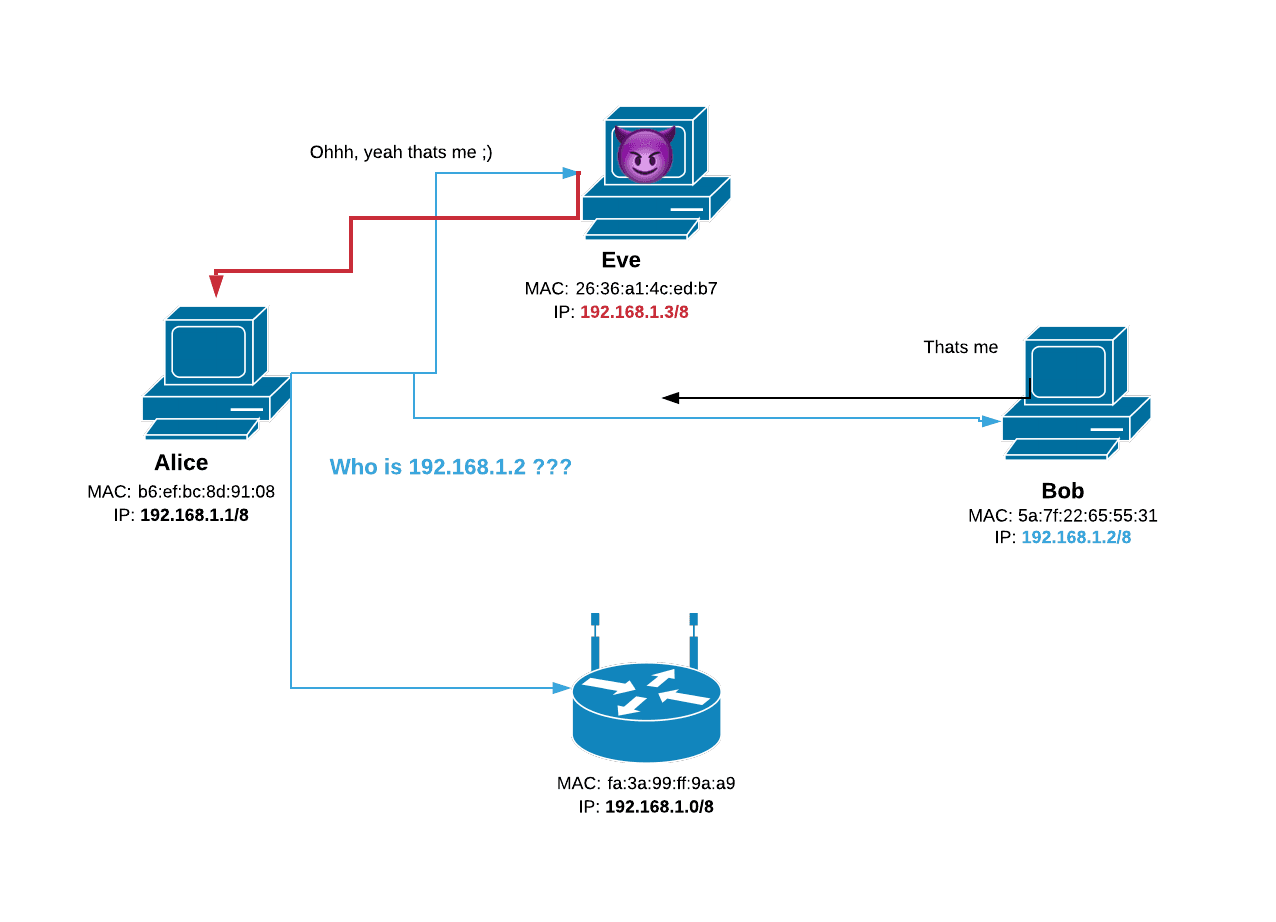
Operating systems maintain an ARP cache to avoid repeating these lookups, but every new device must answer ARP requests at least once to communicate. That’s exactly what makes ARP scanning such a powerful discovery tool.
2. Why Scapy?
Scapy is a Python library that gives you low-level control over network packets. It allows you to:
- Craft custom packets (like ARP requests).
- Send them on the network.
- Capture and analyze the responses.
It’s essentially a Swiss Army knife for packet manipulation. Perfect for tasks like ARP scanning.
3. Building an ARP Scanner in Python
We’ll build a small tool called arp-scanner.py that scans a subnet and lists all connected devices with their IP, MAC, and vendor.
Run it like this:
python3 arp-scanner.py --network 192.168.1.0/24
Dependencies
pip install scapy
Code:
import scapy.all as scapy
import argparse
Step 1: Scan the network with ARP
def scan(ip):
    arp_request = scapy.ARP(pdst=ip)
    broadcast = scapy.Ether(dst="ff:ff:ff:ff:ff:ff")
    arp_request_broadcast = broadcast / arp_request
    answered = scapy.srp(arp_request_broadcast, timeout=1, verbose=False)[0]
    return answered
Step 2: Resolve MAC vendor
def get_mac_vendor(mac):
    mac = mac.upper().replace(":", "")[0:6]
    try:
        with open("mac-vendor.txt", "r") as f:
            for line in f:
                if mac in line:
                    return line[7:].strip()
    except FileNotFoundError:
        return "Unknown"
    return "Unknown"
Step 3: Bring it all together
def main():
    parser = argparse.ArgumentParser()
    parser.add_argument("-n", "--network", type=str, required=True,
                        help="Target network in CIDR format, e.g. 192.168.1.0/24")
    args = parser.parse_args()

    hosts = scan(args.network)
    print("IP\t\t\tMAC Address\t\t\tVendor")
    print("-" * 60)
    for host in hosts:
        ip = host[1].psrc
        mac = host[1].hwsrc
        vendor = get_mac_vendor(mac)
        print(f"{ip}\t{mac}\t{vendor}")
Run the script, and you’ll see a neat table of every device on your network.
4. Why ARP Scanning Matters
Understanding ARP is fundamental for anyone interested in network security. Beyond discovery, ARP plays a central role in attacks such as:
- MITM (Man-in-the-Middle) – intercepting traffic between hosts.
- ARP spoofing/poisoning – redirecting traffic to a malicious host.
This simple scanner is just the beginning of what’s possible when you master packet manipulation.
Conclusion
ARP scanning is one of the most reliable techniques for network discovery. By combining it with Python and Scapy, we gain fine control over packets and the ability to extend our tool further (e.g., saving results to a file, running continuously, or integrating with other security scripts).
🔗 Full code: GitHub Repo